Praxist
Praxist coordinates parallel research agents, experiments, evidence retention, and synthesis across generations. It supplies the reusable research process; your task project supplies the science.
Read the technical paper, Praxist: From Experimental Artifacts to Solution Lineages, for the system design and evaluation.
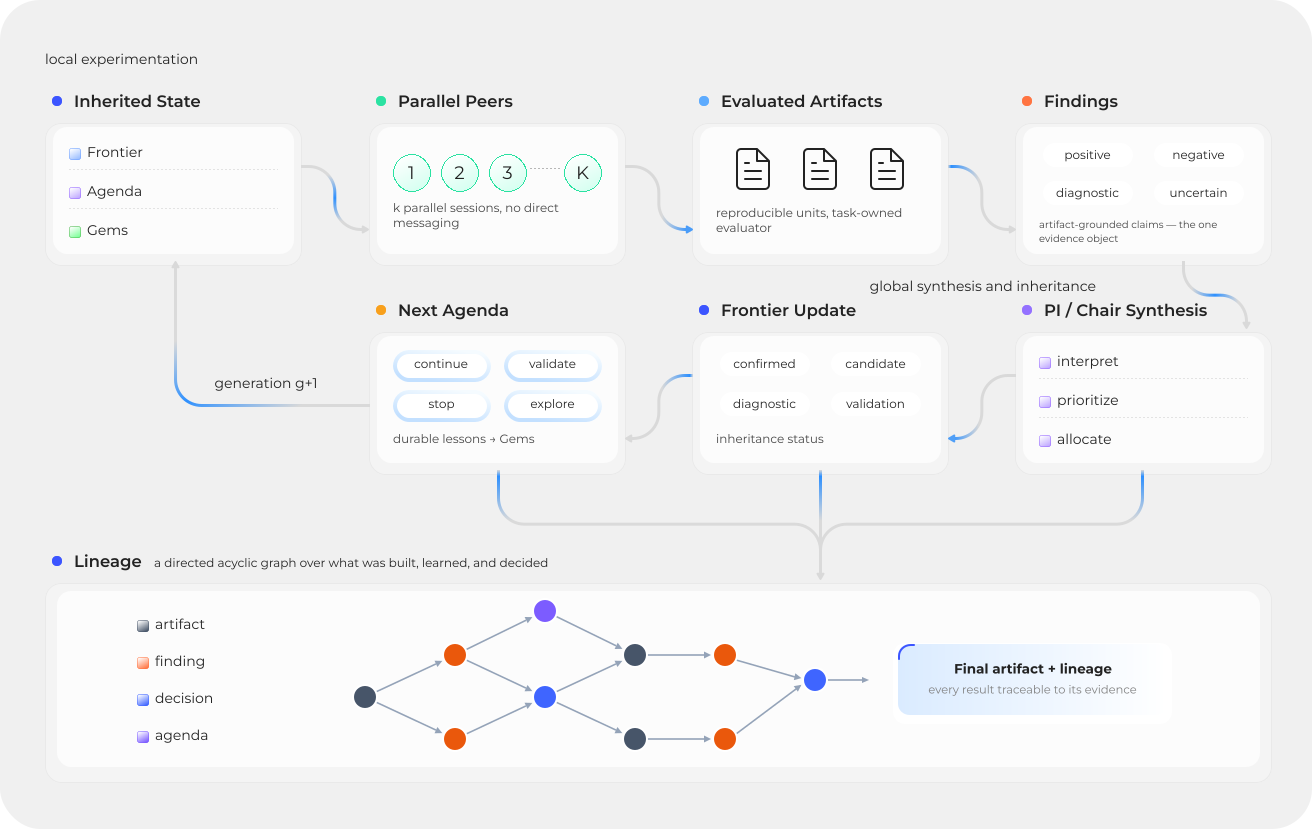
Parallel work becomes measured evidence, durable research state, and a focused agenda for the next generation.
Research Infrastructure, Explicit Science
A coding agent is the recommended interface between the researcher and two deliberately separate systems.
flowchart LR
  HUMAN(("Researcher"))
  AGENT(["Codex / Claude Code<br/>recommended interface"])
  PRAXIST["Praxist<br/>generic research process"]
  TASK[["Task project<br/>scientific contract"]]

  HUMAN --> AGENT
  AGENT --> PRAXIST
  AGENT --> TASK
  PRAXIST <--> TASK

  class HUMAN actor
  class AGENT interface
  class PRAXIST system
class TASK task| Praxist owns | The task project owns |
|---|---|
| Peers, generations, orchestration, resource scheduling, and lifecycle | Objective, constraints, baseline, environment, and permitted changes |
| Agent runtimes, evidence transport, durable state, replay, and synthesis | Evaluator, metrics, protocol, evidence maturity, prompts, and roles |
The boundary keeps Praxist reusable across fields and makes the task project the sole source of domain meaning. Architecture defines the software boundary; Task Projects defines the scientific contract.
Install Praxist
Install and configure Praxist with one command:
python3 -m pip install --index-url https://pypi.org/simple "praxist[agents,codex]" && praxist setup --interactive --install-skills codex
Or let an agent install from PyPI and follow the packaged setup runbook:
codex --yolo
# or: claude --dangerously-skip-permissions
Install and configure Praxist using its packaged OOBE runbook. Stop after readiness checks.
Installation never selects a project or starts research. Before the separate takeover step, read the Quickstart and Your First Task. The selected project must already contain the code and local resources needed to run its baseline; Praxist does not invent missing data, simulators, credentials, or measurements.
Choose A Runtime Profile
-
Start without an API key
Use an existing Codex login through Codex-native mode.
-
Run cost-efficient long research
Prefer a high-cache-hit-rate open-source model API after a representative quality and cache check.
Continue After Setup
-
Prepare a research task
Define the research brief, prerequisites, and launch gates.
-
Operate from the shell
Use the direct CLI for lifecycle and monitoring operations.
The Research Brief Is the Control Surface
Takeover can inspect code and measure an existing baseline, but it cannot infer the researcher's priorities. The brief should identify the objective, credibility standard, allowed resources, exploration policy, and practical run budget. Those decisions shape research direction, experiment throughput, and retention from the first generation onward.
Your First Task provides a complete example and explains how takeover turns that brief into a validated task project.
Find a Specific Answer
| You want to... | Start here |
|---|---|
| Install and configure Praxist | Installation |
| Complete setup and hand off a project | Quickstart |
| Understand project prerequisites | Your First Task |
| Use agent workflows | Agent Skills |
| Diagnose a failure or stall | Troubleshooting |
| Understand the research loop | Research Loop |
| Configure a task harness | Task Projects |
| Choose a scaffold or complete reference | Examples And Templates |
| Inspect a complete Python/JAX project | Rocket Booster Recovery |
| Inspect a complete native Rust project | Rocket Booster Recovery (Rust) |
| Extend Praxist | Developer Guide |
| Look up an exact command | CLI Reference |
The Documentation Policy identifies the sole owner of each contract.